2.3. Menu / Tab Navigation
The modernized EA module has the following feature:
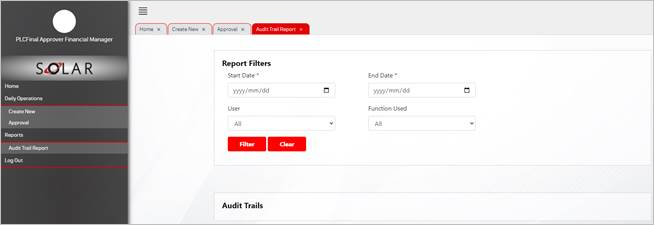
· Each function that is selected from the menu pane is displayed as a tab on the screen
· Users can select multiple functions from the menu and each function will be displayed as a separate tab on the page
· Value of this feature:
· Users with access to multiple functions can select the functions that they want to work on and have these presented as a tab on the main screen
· Users can then navigate between these tabs instead of opening and closing one function at a time from the menu
· The ‘active’ tab on the screen will be shaded in red, as per example below for the ‘Audit Trail’
· To close the tab, click on the X in the tab description and the system will close the screen with the selected function details
Illustration of multiple functions screens presented as tabs: